Datasets
Datasets are a data storage and manipulation mechanism, closely related to the platform’s UI mechanisms (lists, ActiveCV, etc.). We can say that this is a primitive DBMS in memory (or even a dictionary in memory), which, if filled with data, immediately provides the application’s logic.
A dataset as an object has a name, has some settings (indexes by fields, search field settings, etc.) and contains data that could be called an “array of objects”. In the options, you can configure the behavior of the dataset - how the data will be searched, how a specific record will be displayed on forms, etc.
A reference to an object of any dataset in SimpleUI has the form <dataset name>$<_id of record>. This is a universal reference in the system. You can always get a record of any dataset via DataSets.GetObjectStr(<reference>) or a view of an element via DataSets.GetView(<reference>).
In the code below: create a dataset, fill it with data and save it.
datasrv = CreateDataSet("goods") #create dataset goods

#specify hash indexes, search fields by string, record presentation template
datasrv.setOptions(json_to_str({"hash_keys":["article","barcode"],"search_keys":"name","view_template":"{name} , <b>{article}</b>"}))

#add records to the dataset
goods_list = []
goods_list.append({"article":"AUD2071","name":"Table","barcode":"4690626023178"})
goods_list.append({"article":"AUD2075","name":"Chair","barcode":"6924922203797"})
goods_list.append({"article":"AUD2076","name":"Lamp"})
goods_list.append({"article":"AUD2076","name":"Drum"})
datasrv.put(json_to_str(goods_list))

#write dataset to disk
datasrv.save()
Using the dataset
Tables and lists of cards
If you have a dataset, then in order to place a list on the screen, it is enough to simply specify a link to it via ~ . Here is an example of a variable for a Table. Here the “goods” dataset is specified as the source, and the container in which the design of the list elements is set is “list_3_lines”
j = { "customtable": {
         "layout": "^list_3_lines",
         "tabledata":"~goods"}
}

hashMap.put("table",json_to_str(j))
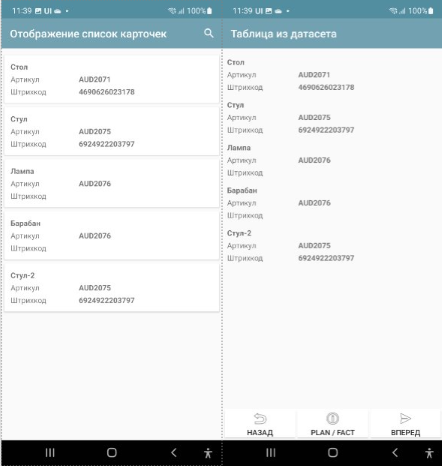
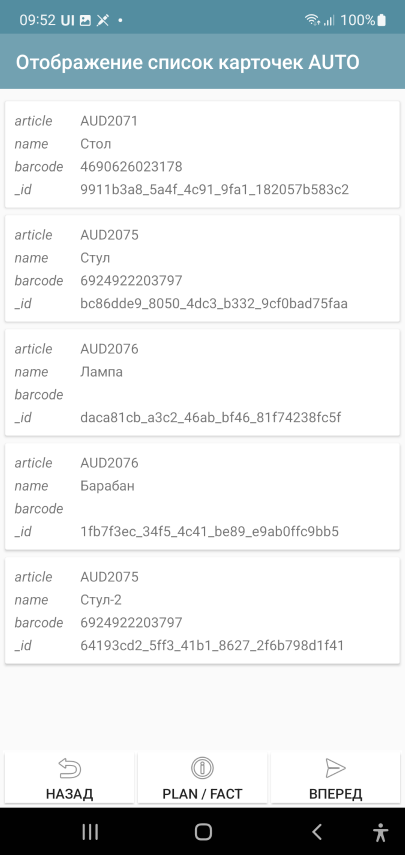
By the way, usually a container is drawn for the lines, but if you don’t want to, you can just write AUTO and it will be generated automatically. As you can see in the screenshot, all fields are displayed, even _id. This can be useful at the development stage, the card form can be made later.
j = { "customtable":{
  "layout": "^AUTO",
  "tabledata":"~goods"
   }
  }
When clicked, a CardsClick event is generated and a universal link (<dataset name>$<record_id>) appears in the variable stack in selected_card_key and also in selected_card_data – the dataset record data as a JSON string
You don’t have to worry about searching either. The dataset has its own search settings section dataset_search, which contains method (search method), keys (search fields), and min_length (optional) - the minimum length from which the search begins.
The method can be:
text - for normal search by string entry
levenshtein - for fuzzy search by Levenshtein distance (results will be displayed in descending order of accuracy, with selection >75, the accuracy itself is added to the records in the _confidence field
By the way, there is now a search_submit option. If it is enabled, you need to press the input confirmation (search symbol on the keyboard), if it is not enabled, the search occurs when you type each symbol. For long lines and complex search algorithms, this is a more humane solution in terms of load.
Example of a table variable with search settings
j = { "customtable":
{
  "options":{
           "search_enabled":True,
           "search_submit":True,
           "dataset_search":{"method":"text", "keys":"name"}
          },
  "layout": "^list_3_lines",
  "tabledata":"~big"
   }
}
Example with fuzzy search
j = { "customtable":
{
 "options":{
           "search_enabled":True,
           "search_submit":True,
           "dataset_search":{"method":"levenshtein", "keys":"name","min_length":3}
          },
 "layout": "^list_3_lines",
 "tabledata":"~big"
  }
}
About large datasets.
By default, pagination is always enabled, it is invisible, smooth. By default, the page size is 100 records. But you can set your own size - through the numeric option page_size. Accordingly, to disable pagination, you need to write a large number there. But do not rush to disable it - with it, the lists are ready to accommodate millions of records without any signs of delay. Not the slightest delay. Here is a video with 1 million records in the dataset.
Dataset fields
You can place reference data entry fields on the screen that contain links to dataset records.
You simply specify a variable in which the field value is or will be stored as a link and the dataset in the value. That’s all. The user simply selects a record from the list, uses the search if necessary. When selecting, a universal link also gets into the variable.
For such a case, it is advisable to define 2 things in the dataset options:
Post view – view_template option. You can use html. Field names are specified in curly brackets. You can place several fields in the view. For example, {name}, {barcode}. You can use html. For example,
{name}:<b>{article}</b>You can specify the shape of the list elements list_layout – container name (default is AUTO)
Example of creating and specifying dataset options:
datasrv = CreateDataSet("goods")
datasrv.setOptions(json_to_str({"list_layout":"item","view_template":"{name} , <b>{article}</b>"}))
You can use the | construct to place a field with a title

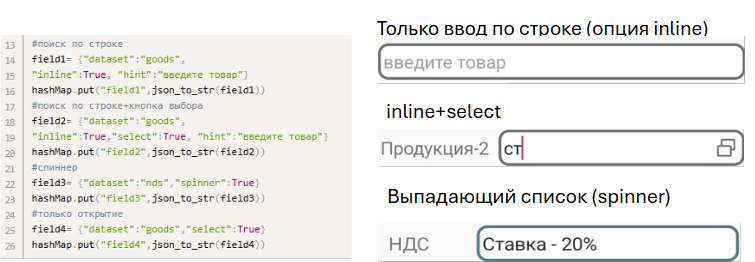
To set the field settings, there is a simplified version and a version with settings. The simplified version is given above, and for settings, you need to specify JSON settings (usually via a variable)
dataset (required) – dataset name
inline – search by string directly in the field
select – button to select from the list
spinner – selection from a list (analogous to a drop-down list) replaces the inline option
hint - hint
Examples of different dataset field settings:
Selected and preset values
The universal reference is used everywhere - both as a result of user selection and for setting predefined values. For example, let’s create the nds dataset:
datasrv = CreateDataSet("nds")
datasrv.setOptions(json_to_str({"view_template":"Rate - {name}"}))

nds_list = []
nds_list .append({"name":"10%","_id":"VAT10"})
nds_list .append({"name":"20%","_id":"VAT20"})
nds_list .append({"name":"0%","_id":"VAT0"})
datasrv.put(json_to_str(nds_list))
And on the screen in onStart we will set the VAT by default
hashMap.put("nds","nds$VAT20")
Then, when you open it, you will see the result:

Direct connection of screen elements with dataset fields
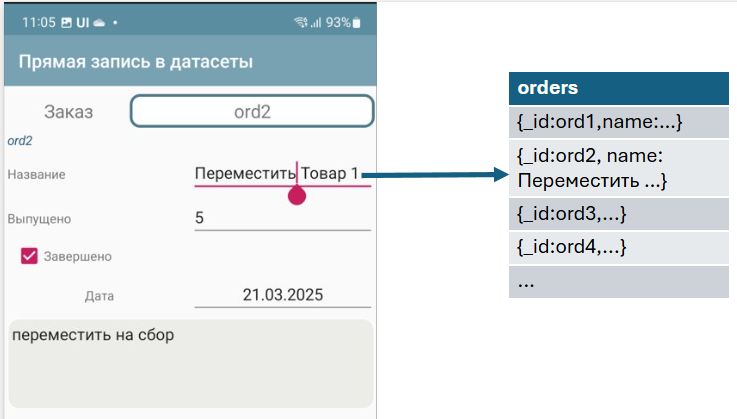
If there is a universal link to the dataset, then you can link regular input fields to a specific dataset record on the screen. Then what the user enters in the fields will be written directly to the record. Moreover, it will be written as soon as the data changes (you only wrote one letter - the data is immediately written to the dataset field, without calling an event).
When you change the text in the input field, direct recording occurs
To do this, you need to specify a variable in the value that will contain a link to the record (universal link), and you need to place the name of the record field in the variable.
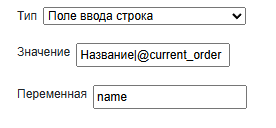
The current_order stores a link, name is a record field.
Note
In order for the system to correctly recognize such fields, the Value must contain a link, so if there is no link yet (for example, when opening), you need to put an empty link <dataset name>$)
Direct recording is possible with elements:
Input field string
Input field number
Password input field
Check mark
Date
Multiline text
Inscription
OCR and Barcode Validators in ActiveCV
Datasets are also used as reference samples (validators) in text recognition (OCR) and for barcode validation. The fact is that they are very fast and, of course, this option is the most preferable for optical recognition.
Validators are reference samples for OCR or barcode scanning. When optical recognition finds an object, it returns a record. All you need to do is specify a dataset for the validator (in the dataset, you must specify which fields will be indexed). So yes, you can check the found test or barcode in the handler, but the thing is that through the validator it happens many times faster and you don’t have to write anything. More about validators - in the ActiveCV section.
Dataset as a data source
A dataset is a memory-resident data storage. And you can access this data. You can get all the records of the dataset all(), pages of records getPage(from,to). You can quickly get a record by _id or an indexed field. For example, if you go by barcode but do not use ActiveCV, but use a regular scanner and you have a dataset - “list of products with barcodes” then you can use it as a regular DB:
goods = GetDataSet("goods")
res = goods.get("barcode","4690626023178")
toast(res)
Creation and filling of datasets, data manipulation.
The dataset is created by the command CreateDataSet(<dataset name>) or CreateDataSet(<dataset name>,<options>) or the options can be set separately after creating the dataset object setOptions(<options>). Options are a json object of the form {"hash_keys":[<keys>,…],”key”:[<keys>,]}. All options are optional.
Possible dataset options:
search_keys - keys (separated by commas) by which the search in the list is performed
view_template - presentation of an element in a dataset field. Keys are specified in the format {<key>}, it is possible to use html tags
list_layout - container for the selection list from dataset fields
hash_keys - an array of field names by which the hash index will be created.
key - you can specify a list of fields from which the id key will be generated if it is not specified, or you can simply specify the id in the entry, or if the id is not specified in the entry and the key is not specified, the id will be generated automatically.
You can also get a dataset by copying it from another dataset, then its options will be copied. The command copy(<new dataset name>) or copy(<new dataset name>,<start line>,<end line>)
my = big.copy("my")
Datasets are replenished with the put command, where a string with a JSON array is passed as a parameter.
Where does the data for the array in put come from? I’ll give a few examples
Example 1. Simply in the online handler. Now in SimpleUI there are two types of online handlers - via HTTP request (online) and via web sockets + script bus, which I wrote about here. And actually you can call the online handler and put data into the dataset via put. But there can be a lot of data at a time and it will take a long time to transfer it via the handler. Let’s look at other examples.
In the example below the language is Python, but it could be an online handler in the back-end system and the language would be, for example, 1C:
hashMap.put("CreateDataSets",json_to_str({"goods_online":{"hash_keys":["article","barcode"]}}))
data = {"goods_online":[{"article":"EZ9F34132","name":"SE 32A, 4500", "barcode":"3606480586873"},
{"article":"EZ9F34116","name":"SE 16A, 4500", "barcode":"3606480586842"},
{"article":"EZ9F34110","name":"SE 10A, 4500", "barcode":"3606480586835"}
]}
hashMap.put("PutDataSets",json_to_str(data))
Example 2. We have uploaded data from 1C to CSV and do not want to do REST or ODATA, we just put them in a file on Yandex Disk. This example involves several mechanisms. First, the python handler works with the Yandex API to get an internal link, then a worker is launched to download (which will finish downloading the file, even after rebooting the device and with the application turned off), then, when the file is downloaded, we read the CSV and finally write it to the dataset. Brrr… complicated? Well, at least the file just lies on Yandex Disk, no need to start the server. In this example, you can write variations - the file is not CSV but immediately a JSON array, not on Yandex Disk but on the server with a direct download link. It is not necessary to use a worker - this is for large files.
import requests
from urllib.parse import urlencode
from ru.travelfood.simple_ui import SimpleUtilites as su
import os
import csv


base_url = 'https://cloud-api.yandex.net/v1/disk/public/resources/download?'
public_key = 'https://disk.yandex.ru/d/U6YrMsXQmMbfOA'

# Get the download link
final_url = base_url + urlencode(dict(public_key=public_key))
response = requests.get(final_url)
download_url = response.json()['href']

# Option 1 - for small files
#download_response = requests.get(download_url)
#with open(su.get_downloads_dir()+os.sep+'p_menu.txt', 'wb') as f: # Specify the desired path to the file here
# f.write(download_response.content)

# Option 2 - for large files
def after_download_1():
     import csv
     with open(hashMap.get("DownloadedFile"), encoding='utf-8-sig') as f:
        reader = csv.DictReader(f, delimiter="\t")
        dataset = list(reader)
        goods =GetDataSet("goods_load")
        goods.put(json_to_str(dataset))
        hashMap.put("RefreshScreen","")
        toast("Loaded...")

postExecute = json_to_str([{"action": "run", "type": "pythonscript","method":get_body(after_download_1) }])
su.download(download_url,None,None,'goods.txt',postExecute)
Example 3. We published the automatic aData interface from 1C in a few clicks and simply receive data from it directly*. How does filling the dataset look like in this case:
import requests
from requests.auth import HTTPBasicAuth

orders = GetDataSet("orders_load")
if orders == None:
    orders = CreateDataSet("orders_load")
    orders.setOptions(json_to_str({"view_template":"{Number}", "list_layout":"order", "search_keys":"Number"}))

    url = "http://192.168.1.41:2312/kademo/odata/standard.odata/Document_CustomerOrder?$format=json"
    r = requests.get(url,auth=HTTPBasicAuth('usr', ''))
    result = r.json()
    records = []
    for record_1c in result["value"]:
        new_record = record_1c
        new_record["_id"] = record_1c['Ref_Key']
        records.append(new_record)

    orders.put(json_to_str(records))
    hashMap.put("RefreshScreen","")
    toast("Loaded...")
Data manipulation
Copying
my = big.copy("goods") #copies completely

#or

my = big.copy("big",0,3) #copies from 0 to 3 position
Selection
The dataset can be filtered by a condition using the filter(<condition>) method, where the condition is specified in the same syntax as for Pelican/SimpleBase or MongoDB https://simplebase.readthedocs.io/en/latest/querys.html
Sorting
my.sort("-name") #descending by name field
my.sort("name") #ascending by name field
Cut
my.cut(0,3)
Cleaning
my.clear()
Fuzzy search
The dataset has a method findTextLevenshtein(String text,int confidence), to which the search string and the required accuracy are passed.
ds = GetDataSet("goods") #get dataset with goods
goods_select = CreateDataSet("goods_select") #create a new dataset for search results
results = ds.findTextLevenshtein("name",hashMap.get("voice_text"),75) #call fuzzy search, accuracy 75
goods_select.put(results) #write results to a new dataset
The output will be records for the dataset with the appropriate accuracy, sorted by accuracy in descending order. Each dataset element will have a _confidence accuracy field added.
Storage/Loading
The dataset object has 2 methods without parameters save() and load(). In addition, the dataset has a method isSaved() that returns True if the dataset was written and last_saved(), which returns the date of the last save.
Explanation of the use of datasets in SimpleUI in terms of local storage. In what cases can and should you abandon the DBMS in favor of a dataset.
Let’s take a closer look at the data flows that appear in the mobile solution. SimpleUI is a framework for business applications and, one way or another, solutions based on it are a kind of application or extension of the functions of back-systems (ERP, MES, WMS, etc.). That is, it is a kind of front. Even if the configuration is “independent” and works locally, it most likely interacts with the back-system at some point - takes or gives data. That is, the solution can be online with the back-system, offline, and what I call “pseudo-online” (when data is written locally and sent as quickly as possible), but one way or another, its existence makes sense only if it exchanges data with one or more systems for which it works.
Different classes of data in a mobile application
What kind of data comes and goes? I divided it into classes in order to understand how to work most conveniently with different classes of data.
By dividing the data, I made the assumption that different classes of data require different approaches, that there is no single super-DBMS for a mobile solution (based on a combination of criteria), and that a differentiated approach is needed to select a storage tool depending on the life cycle of the data. It is the life cycle that The cycle within the application defines the requirements for the storage tool.
And datasets are, first of all, data that comes to a mobile device from outside, from the back-system. These are, first of all, reference books, but also documents, tasks, orders. That is, what does not change in a mobile application, but simply exists for reading and, as a rule, has links to objects of external systems. So Do you need a DBMS for something that doesn’t change? After all, there is no rewriting at critical moments for performance - when the user is working with the UI, there is no deletion. A simple CSV or JSON file would be quite suitable for this purpose. Yes, with 1 million records, loading a large JSON will take 0.5 seconds, but this loading occurs in the background at certain times and does not interfere with work.
Note
When it comes to decisions related to goods or equipment/fixed assets, I recommend using the principle of a flat table (1NF), i.e., for example, if a product is identified by a barcode, then create a table Barcode-Article-Product Name-Unit-Product Link-Unit Link. Yes, it is possible to create several tables in a relational DBMS with external links? Why? When a product is scanned (or searched by article), you instantly receive all the data on the product. Nothing else is needed on the front end.
What and how do we win with Datasets? And due to what principles?
The first principle is deep integration into the platform mechanisms. For example, it is enough to place data in a dataset and we already get a display in the form of lists with the desired design (the design is set by containers). As happens with any DBMS - the data must be selected, a list of records must be formed and placed in the list adapter (here you also need to remember about JSON transformations). But here you don’t need to do any of this - the list at the application level takes data from the dataset. The video above shows how a list with 1 million records works. This is a consequence of the integration principle. The same thing with OCR - when text flashes in the video stream, you need to get to the data very, very quickly, otherwise everything will not be smooth.
The second principle is the lack of need to maintain data. A dataset is just put, save/load basically (no, there is also get and selections and manipulations as desired). It can be replenished in upsert mode by key, but by and large it exists as a simple list that can be saved/loaded. No need for Insert/Update/Delete and selections. It is just a list hanging in memory that can be saved/loaded. It is not a DBMS.
The place of Datasets in storage architecture. Differentiated approach to storage.
SimpleUI has a whole palette of DBMS. It would be possible to store all data in JSON-oriented noSQL Pelican. But it is recommended to conditionally divide the data into classes. Then you can select simpler tools for each class:
key-value for constants, settings, user input caching, logs
data from external systems (directories, documents, links) - datasets
data created in the application, documents, local accounting objects - Pelican, which again uses universal dataset links, for example.
This is the division of approaches offered to the developer. For example, in the dataset field, select a product (receive a universal link), and indicate the quantity on the screen. And record all this in the Pelican DBMS
db = Pelican("samples_db1")
db["orders"].insert({"sku":"goods$100","qty":10})